Free Online Company Seal Maker (Transparent PNG)
Start with a standard round company seal or an oval company stamp, then adjust the company name, bottom code, font size and spacing. Export a transparent PNG or stamp a PDF entirely on your device.
Use company and organization seal templates only for your own entity or with explicit authorization.
Ready-to-use preset styles
Click a preset to open it in the editor, then change the text, code and border color before exporting a transparent PNG.


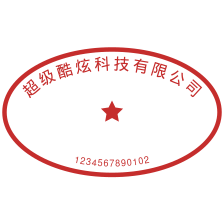

Specs and layout
- Common shapes
- Standard round seal, with an oval company variant
- Text layout
- Company name curved along the top arc; optional code along the bottom
- Center mark
- Classic five-pointed star, resizable or hidden
- Export
- 2x transparent PNG, or embedded directly into a PDF
Common use cases
- Internal approval sheets, notices and electronic document drafts
- Design mockups, proposals and presentation placeholders
- Authorized electronic copies of quotes and certificates stamped locally
Layout and export tips
- • For long company names, reduce the font size or adjust letter spacing so the top arc stays balanced.
- • To use the PNG in Word or WPS, insert it and set the image wrap mode to “In front of text”.
- • All seal data stays in your browser's IndexedDB; company names and codes are never uploaded.
Frequently asked questions
Is the exported company seal transparent?+
Yes. Easy Seal renders a transparent PNG through Canvas at 2x resolution, so it overlays text in Word, WPS or a PDF without a white background box.
Can I add a 13-digit code at the bottom of the seal?+
Yes. Choose the company seal template with a code field, then type the digits in the editor. The code follows the lower arc and can be resized independently.
Is an electronic company seal legally binding?+
Easy Seal is a design and document-preparation tool, not a qualified electronic signature service. Use it only for documents your organization is authorized to seal, and follow the e-signature and seal rules that apply in your jurisdiction. Never forge government, company or personal seals.